6 min read
I taught a model to draw like a hand
Diagram tools put boxes at exact coordinates and stamp the same letters every time. You can tell at a glance that no hand was involved. So I trained a model that looks at a sketch and draws it again the way a person at a whiteboard would: one stroke after another, in a human order and rhythm, with the labels written by hand.
Why generated diagrams look fake
A real sketch has habits. You draw a box, then write its name into it. An arrow starts a little outside the box it leaves and slows down before the one it reaches. Every “a” is a bit different. Software that places shapes on a grid has none of that. It makes a finished picture, not the act of drawing it.
Learning to draw backwards
There's no large dataset of pictures paired with how someone drew them. But there are recordings of the drawing itself. Google's Quick, Draw! has millions of timed doodles, and MathWriting has handwritten formulas with a timestamp on every pen point. From a recording I can make the picture myself. So training runs backwards:
- Take a recorded human drawing.
- Render it into an image and make the image worse on purpose: thinner or thicker lines, blur, a slight warp, noise, and grey bars where the text was.
- Show the model only the image, and ask for the original pen movements.
On top of the human drawings I built 150,000 whiteboard diagrams out of human doodles and human handwriting, so the model also sees boxes, arrows and labels.
The model
Stylus has 934 million parameters. A vision encoder (SigLIP) looks at the image, and a small language model (Qwen2.5-0.5B) writes the drawing. It doesn't write words, it writes pen events: move the pen here, draw this curve in 40 milliseconds, start writing label 2. Every curve is a cubic Bézier, so a whole diagram is a few hundred events instead of tens of thousands of points.
The hour that didn't work
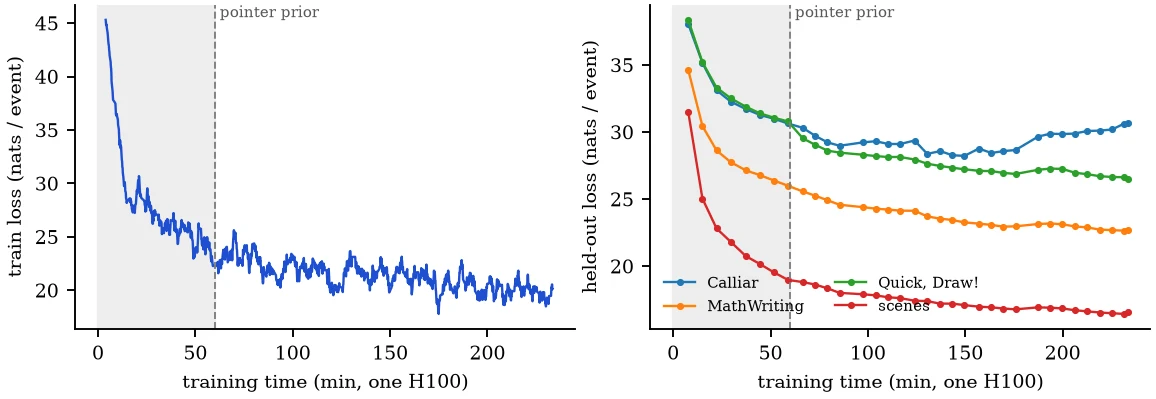
I trained on one rented H100 and looked at real drawings every 30 minutes. After the first hour the loss was going down and the drawings looked plausible, but they were the wrong drawings. Stylus had learned what a sketch looks like in general. It drew a diagram, just not the one in the image.
The loss for “where does the next stroke end” had nearly stopped moving. The model had to find a spot on a 1000 × 1000 grid purely from its hidden state, and that's a slow way to learn to look.
Pointing at the picture
The fix was small. Before it picks the exact coordinate, the model now points at one of the 27 × 27 image patches, by attending over what the vision encoder sees there. That pointer becomes a prior for the coordinate, and the old head only refines the position inside the patch. It adds 0.46 million parameters and slots into the half-trained model.
On held-out doodles, the end-point loss had moved from 5.50 to 5.47 in the last 500 steps of the first run. In the first 500 steps with the pointer it fell to 4.53, and the drawings started to follow the image. One honest caveat: I fixed my renderer at the same time, because at the stroke width I had picked, handwriting at 384 pixels turned into black blobs. So it isn't a clean experiment.
Where it stands
On held-out drawings, Stylus orders its strokes much more like a person than a program that traces the image. The rank correlation with the human order is 0.90 against 0.69 on formulas, and 0.75 against 0.26 on diagrams. Its motion is closer to human on formulas and doodles. But the tracing program copies the image almost exactly, and Stylus doesn't. It's off by about 8 thousandths of the canvas on formulas and diagrams, and by much more on free doodles.
What still isn't good:
- Letters. Labels land in the right box, in the right order, but they're often hard to read.
- Short pieces. It chops lines into more, shorter strokes than a person would.
- Loops. On dense little icons it sometimes gets stuck and scribbles in one spot. A limit on how much ink one image patch may get helps on diagrams, but it doesn't fix it.
- Calligraphy. Dense Arabic calligraphy fails completely.
A proof of concept, not a finished model
That's the honest frame for all of this. I wanted to know whether a model like this can be trained at all: from public data, without anyone drawing training examples, on one GPU in an evening. It can, and it learns the part that matters most for looking human, the order and the rhythm of the strokes.
It isn't finished. In those few hours it saw less than one pass over its training data, and the losses were still falling when I stopped. Precise shapes and readable handwriting would take far more training. My estimate is weeks on expensive high-end GPU hardware, plus a sharper view of small text and a way for the model to see what it has already drawn.
From a sentence to a drawing
For a text request, a language model plans the labels, a diffusion model draws a whiteboard sketch with grey bars where the text goes, and Stylus draws it with a pen. I fine-tuned the diffusion model for 8 minutes on my diagrams, and that changed a lot: it went from hatched pseudo-tables with fake text to clean boxes and arrows.
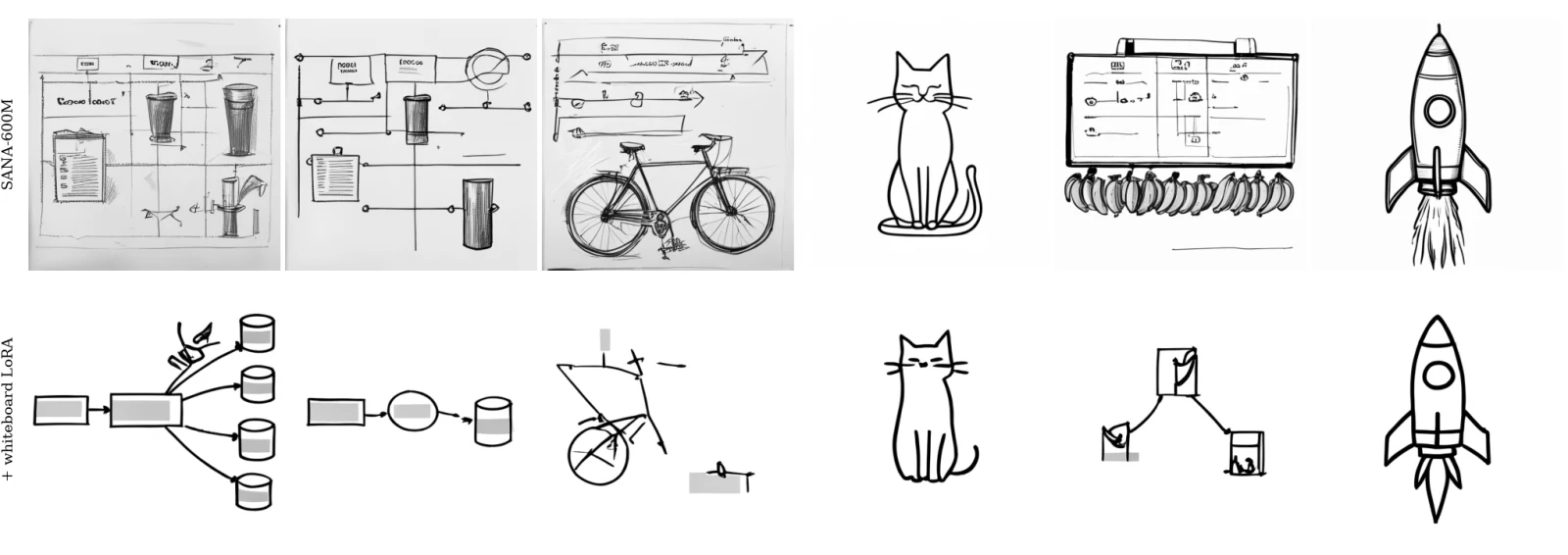
Boxes and arrows work end to end. Objects don't yet. The one I wanted most, a load balancer that balances bananas, gets its sketch right every time. Stylus then draws the client and the load balancer and collapses into scribbles at the bananas, on all six seeds I tried. It's on the project page anyway.
What it took
Everything ran on one H100 GPU: about four hours of training for Stylus, eight minutes of fine-tuning for the diffusion model, and the evaluation.
Compared with Inkside
If you just want a good-looking handwritten diagram today, my other project Inkside is far better at it. Its components look right, its letters are always readable, and the same banana load balancer comes out clean. But Inkside isn't a neural network. It places pre-drawn elements in a human way: each component was drawn and polished by AI agents beforehand, and the human touch comes from rules I wrote.
That was never the goal of Stylus. Stylus is meant to learn the drawing itself from real people, the order, the rhythm and the hand, so that it can draw things nobody prepared for it. It is much worse today and much more general in principle. The Inkside post puts the two approaches side by side.
The paper
The paper (PDF) has the data pipeline, the model, the training story including the hour that didn't work, all the numbers, and a long list of limitations.